

Integrations
Restaurant Software Integrations and Webhooks
Which outside systems Wox connects to today, how supplier webhooks work, and how to set up an integration that someone still understands six months later.

Every restaurant runs on more than one system. The POS knows what sold, the supplier knows what was delivered, the accountant wants both by the fifth of the month, and somewhere in between a manager copies numbers from one screen to another. Integrations exist to shorten that walk.
This guide covers the connections Wox offers today, what each one actually moves, and how to set up the one that is most often misunderstood: the outbound webhook that suppliers use to receive order events. It ends with a short routine for keeping any integration healthy once it is live.
Start with the data, not the tool
Before connecting anything, write down one sentence that describes the problem. "Our accountant retypes every waybill" is a good sentence. "We want integrations" is not. The first tells you which data has to move, in which direction and how quickly. The second leads to a connection nobody owns.
For most restaurants in Georgia, that sentence ends up being about purchase documents. Every delivery from a registered supplier already exists as an electronic waybill on rs.ge, and that is the connection that removes the most manual work.
The rs.ge connection
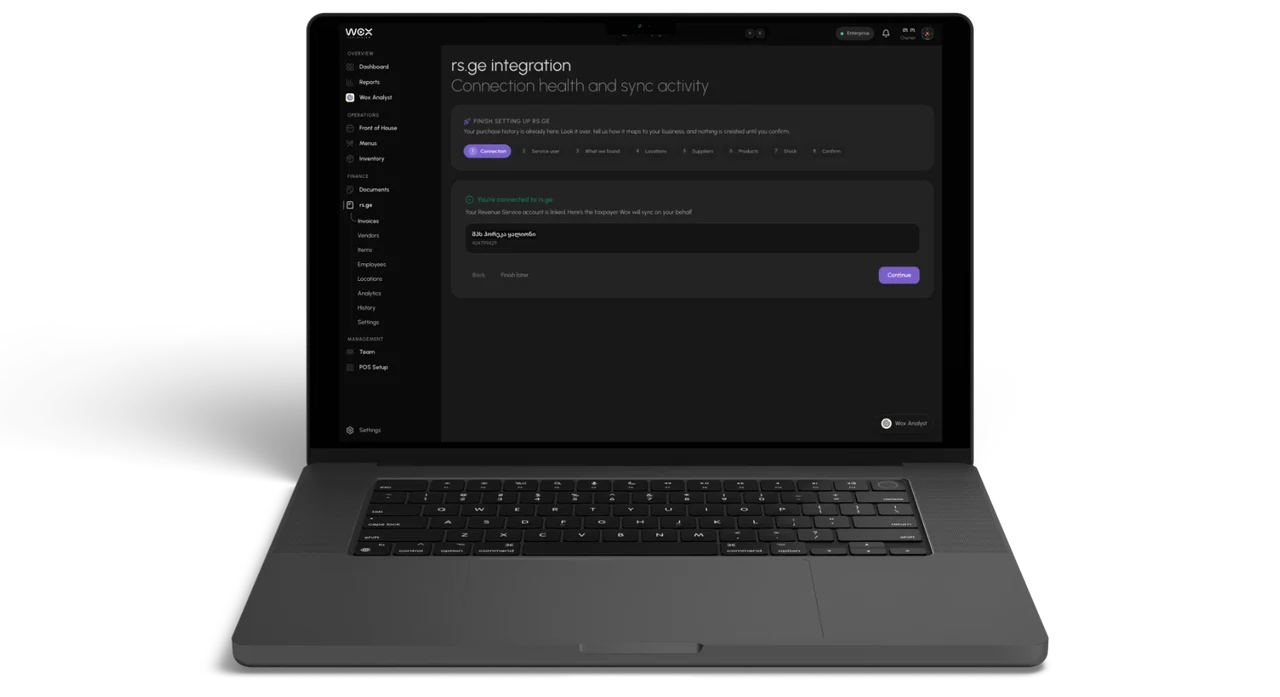
Wox connects to the Georgian Revenue Service and imports your waybills. On first connection it pulls twelve months of history, and after that it syncs every night. From those documents Wox proposes suppliers and items, matches them to what you already have, and builds a clear record of what you bought, from whom and at what price.
Nothing reaches your stock until someone reviews it. A manager checks the proposed suppliers and items, merges duplicates and confirms. Only then do quantities move. Prices on imported waybills also feed each item's price history, which is what recipe costs read. The rs.ge integration page walks through the setup screens.
Getting data out for your accountant
Not every integration needs a live connection. Several reports in Wox export to CSV, which is often all an accountant or a spreadsheet needs. For a full copy of your organization's records you can request a data export: Wox prepares a JSON file and emails a download link that stays valid for seven days. The data export guide lists what is included.
A monthly export that someone actually opens is worth more than an automated feed nobody checks.
Supplier webhooks
Webhooks run in the other direction. A supplier sets them up inside the vendor portal, and they let the supplier's own system hear about orders the moment something changes, without anyone logging in to check.
A supplier can subscribe to three order events: an order was created, an order was updated, or an order was cancelled. Each delivery is an HTTPS POST with a JSON body that carries a unique event id, the event type, the time it happened and a snapshot of the purchase order, with its lines, totals, status and the ordering location.
A few details matter for whoever builds the receiving end.
- The endpoint must be a public HTTPS address. Addresses that resolve to private or local networks are rejected.
- Every request is signed with HMAC-SHA256 using a secret that is shown once, when the webhook is created. Wox cannot display it again.
- The receiver should answer within 30 seconds. Slow work belongs in a background job on the receiving side.
- Failed deliveries are retried after 1 minute, 5 minutes, 30 minutes, 2 hours and 12 hours. A retry can arrive after a success the receiver did not acknowledge, so use the event id to skip duplicates.
Order events are sent only when the ordering restaurant's plan includes vendor webhooks, which is part of Enterprise. Supplier ordering inside Wox is also not open to every restaurant yet, so a supplier may set up a webhook and see only test events for a while. That is expected, not a fault.
Setting up a supplier webhook
- 1Decide which order events your system needs. Most suppliers want order created and order cancelled; add order updated if quantities often change after an order is placed.
- 2Prepare a receiving endpoint on a public HTTPS address that accepts JSON POST requests.
- 3In the vendor portal, open Webhooks, choose Add webhook, enter the endpoint address and select the events.
- 4Copy the signing secret as soon as it appears and store it in a secrets manager or an environment variable. It is shown only once.
- 5Make the receiver verify the signature, using the timestamp and the raw request body, before it processes anything.
- 6Send a test event from the Webhooks page and confirm that the delivery status changes to succeeded.
- 7Watch the delivery history for the first few real orders to check timing and content.
- 8Write down the endpoint, the subscribed events, where the secret is stored and who owns the receiver.
An integration without an owner is a future outage with no one assigned to it.
Replacing a secret without downtime
A signing secret cannot be changed in place. If it leaks, or a developer who knew it leaves, replace the webhook in a way that never leaves the receiver without a valid secret.
- 1Create a new webhook with the same endpoint address and events, and store its new secret.
- 2Update the receiver to accept signatures made with either the old or the new secret.
- 3Confirm that the new webhook shows successful deliveries.
- 4Delete the old webhook and remove the old secret from the receiver.
Keeping integrations healthy
Most integrations fail quietly. A certificate expires, a server moves, a password changes, and for a week nobody notices because nothing complains. The fix is rarely more technology. It is a name and a calendar entry.
- Give each integration one owner, a person rather than a team.
- Check the rs.ge sync status and the webhook delivery history once a week, on the same day.
- After any change on either side, send a test and confirm it arrived.
- Keep the setup notes where the next person will find them, not in one person's inbox.
When something does break, the delivery history usually says why: a status code from the receiver, a timeout or a rejected address. Start there before changing anything. For other connection problems, the troubleshooting guide lists the common causes.
Questions people ask
Which integrations does Wox support today?
The rs.ge connection for Georgian waybills, CSV exports from reports, a full organization data export, and outbound webhooks that suppliers configure in the vendor portal for purchase order events.
Can a restaurant receive webhooks from Wox?
Webhooks are set up by suppliers in the vendor portal and carry purchase order events. Restaurants move their data through the rs.ge sync, report exports and the organization data export.
What happens if our webhook endpoint is down?
Wox retries after 1 minute, 5 minutes, 30 minutes, 2 hours and 12 hours, then marks the delivery as failed. The delivery history shows each attempt and the response your endpoint returned.
We lost the signing secret. Can Wox show it again?
No. Secrets are stored encrypted and shown only once. Create a new webhook, switch the receiver to the new secret, and delete the old webhook.
Does the rs.ge import change our stock automatically?
No. Imported suppliers, items and documents wait for review, and stock moves only after a manager confirms them.
Related guides
Vendor Portal for Restaurant Suppliers
How restaurant vendors and operators can collaborate through the supplier portal for faster order confirmations and fewer ordering errors.
Low-Stock Alerts and Restaurant Notifications
How to configure low-stock alerts, order cutoff reminders, and notifications to stay ahead of restaurant inventory and purchasing needs.
Restaurant Data Export and Scheduled Reports
How to export restaurant operations data and set up scheduled food cost, COGS, and inventory reports for recurring review.
Background reading
Restaurant Inventory Management: The Complete Guide for 2026
Inventory is one of the largest expenses a restaurant carries, typically accounting for 28% to 35% of revenue. Yet many operators still rely on pen-and-paper systems, spreadsheets, or inconsistent counting methods that leave thousands of dollars in waste, theft, and over-ordering invisible. This guide covers the fundamentals of restaurant inventory management, from counting methods and par levels to technology adoption and waste reduction.
10 Inventory Habits That Lower Food Cost and Keep Kitchens Running Smoothly
Practical guidance for chefs, managers, and restaurant owners
How to Reduce Food Waste in Your Restaurant: A Data-Driven Guide
U.S. restaurants and foodservice businesses generated 12.5 million tons of surplus food in 2024, and 85.9% of it went to landfill or incineration. For an industry operating on 3% to 5% net margins, waste is not just an environmental issue—it is a direct and significant drain on profitability. This guide covers the primary causes of restaurant food waste, how to measure it, and the operational strategies that produce the largest reductions.
The feature behind this guide
Your rs.ge waybills, already in your inventory
Connect rs.ge once and Wox imports 12 months of waybills — building your vendor list, item list, purchase history, and opening stock without manual data entry